

Product Overview
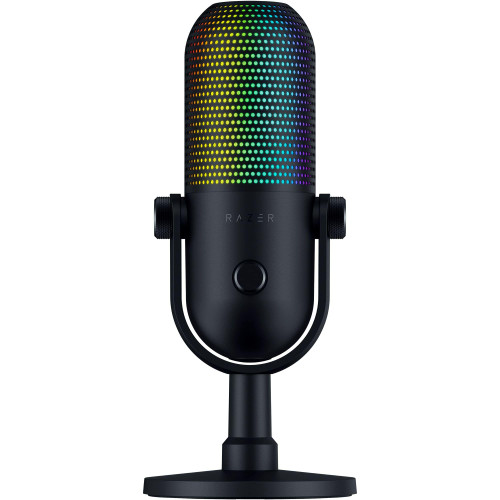
Alias, designed from the ground up for gamers, elevates streams and content creation to broadcast-quality levels. With a 3x bigger capsule than other mics for accurate voice capture, express yourself to your audience. Enhance your audio with Sonar Software, which features easy-to-use drag 'n' drop app routing, AI noise cancellation, and a 10-band parametric EQ.
Dimension
Product Height : 9.05 inches
Product Width :4.33 inches
Product Depth :5.12 inches
Product Weight :1.65 pounds
Features
Designed For Gamers Mic for gaming, broadcasting, and podcasting, level up your stream with Alias and free audio software.
3x Bigger Capsule Capture a wide range of vocals with a capsule up to three times bigger than other mics.
All-In-One Software Sonar is the ultimate audio solution, with mixing, easy drag and drop app routing, AI noise cancellation, and more.
Led Monitoring Check the audio levels and mute status at a glance with green-to-red lighting right on the mic.
RGB Downlight Enhance the ambiance with a customizable RGB light emanating from below the mic.
Shock-Mount Integrated mount reduces unwanted vibrations for clearer sound. Compatible with included desktop stand or boom arm (sold separately).
What's Included
Alias USB Microphone
Reviews
20 Reviews Hide Reviews Show Reviews
-
5 An Easy Pill to Swallow
Posted by Heath London on Aug 16th 2026
This is easily the best USB microphone I have had. Vocals on the Alias have been clear. The stand is sturdy. The shock mount is both stylish and effective at minimizing vibrations. The desk stand is sturdy. The ability to mount this to a microphone arm is an excellent selling point. And, come on, it just looks amazing. The Sonar application has come with a bit of a learning curve, but all-in-all, this is an exceptionally good package. Anyone looking for a USB microphone for streaming or podcasting should check it out. I am incredibly impressed with this pill shaped microphone. Setup: Inside the box, you get the microphone with stand, a USB-C to USB-A cable, and a boom arm adapter. Installation is plug and play, but if you want access to streaming features, mixers, and lighting controls, you will need to install SteelSeries GG with Sonar. Experience: I love the size of the microphone. I love having the LED level indicator, mute toggle, MIC, and volume gain dials on the microphone itself. As said previously, my recordings have sounded great. This is a great piece of hardware and I have no complaints. Lighting is controlled through the Engine / Gear section of GG and PRISM. PRISM controls the illumination light on the bottom of the microphone while the LED Gain indicator and the mute indicator are controlled from the Gear section of GG. I am not sure why these pieces of software are not combined, but it works. By default, the gain indicator lights are green, green, green, yellow, and red, but you could change those lights to all blue for instance. To control audio mixing, you will need the Sonar plug-in installed with GG. Sonar is where I had some difficulties. Now Sonar will work with any audio device and not just the Alias microphones. You have toggles within Sonar to select your playback device, your streaming playback device, and your microphone input. On three computers, this all worked fine, but on an ASUS computer, I had difficulties getting the microphone input working because there was a software conflict with ASUS' Armory Crate. Should you find yourself struggling with red error messages in Sonar and you are using an ASUS computer, I found that if you revoke microphone access to ASUS' Armory Crate from within Windows 11 Privacy controls that should fix the problem. In my case, there was a software conflict between Armory Crate and Sonar. Even though I didn't have the audio controls within Armory Crate turned on, it still created a conflict with GG and Sonar. There is a learning curve with Sonar. Getting everything tweaked exactly right for streaming has taken me a few days of testing, and I am still figuring it out. SteelSeries have included audio mix presets for many games that sound good to me, but learning and assessing all the mixes and toggles will take a bit of time. Conclusion: The software has taken me a bit of time to get my head around, but I am getting there. I absolutely love the Alias microphone. The engineers and designers at SteelSeries have outdone themselves once again. The Alis a stylish microphone. It looks impressive on the desk. My recordings sound great. I am planning on getting a boom arm. This is now my go-to microphone. I highly recommend it. 5/5 Easily Recommend
-
5 Great Sound Rec, Light Indicators, Nice Software
Posted by Annette Turley on Aug 14th 2026
I was in need of a nice quality microphone that was entry level that would aid during video recording / voice overs. I decided to try out the SteelSeries Alias as I have always enjoyed their products. I decided to try out the Alias instead of the pro as I am fairly new to this. I was very impressed with how easy it was setup and the software that you use with the microphone. There was not much in the packaging and the software had to be downloaded / installed off their website. Its pretty much plug in play via USB C and does not require a power cord which is a nice plus. You can tell that the mic itself is made well and is very stable on the stand that is included. I really liked the shock absorbers that the mic has upon if ever needing to move the mic/stand around the table. The lighting was very impressive and gives great indicators of the audio levels , mute and ambiance. I like how there are nobs to adjust the mics instead of always having to refer back to the software itself. It does come with a "Boom Arm" adapter for those who has the arm to attach too. I kind of wish it had a shield however those are very easy to find and purchase so was not too worried about that. The software itself was very impressive, I really enjoyed the customization that I am able to perform with the Mic boost, noise cancellations and equalizer. It even had a nice section to change up how the color flows under the mic. Overall I was very impressed with this mic, the ease of use, great sound recordings and noise cancellation works perfect for my environment. Especially recommend for entry level into the gaming / streaming world.
-
5 Outstanding beginner streamer's mic.
Posted by Mikaela Tidwell on Aug 10th 2026
Based on looks alone, I am really liking this Alias microphone design language. Although it's marketed to gamers, the black metal, plastic and fabric finish look rather professional to me. Of course, once the RGB goes on, it's gamer time, although I will say that the glow is rather subtle. I appreciate the LED sound gain bar and the "x" when the mic is muted. The mic is heavy but also well-balanced on the sturdy base. The shock mount does a good job in minimizing vibration. The haptic mute control and headphones monitor are in the front, while the 3.5mm jack, USB-C output, and gain control is in the back. Initially, I thought the gain being in the back would be awkward, but I noticed that when I had all my settings right, I rarely had to mess with that. I tried installing into a regular and a low-profile boom arm and thought that it is a bit too big and heavy for my taste. You will need a very sturdy boom arm for sure. This is not big deal for me as I will use this at my work office. The microphondy to go right out of the box – "just plug-and-say" Steelseries says. Testing as is, I found the microphone's unidirectional oversized capsule's pick-up was good enough and clear at about 10-12", speaking straight into the mic. The tonality has good bass and does not sound tinny. Pops may be heard if you are too close, but it's OK if the LED does peak into the red. The microphone does a decent job with background noise, but keystrokes -especially from mechanical keyboards, can be fully heard, so make sure to put the keyboard behind the mic. But what pushes this microphone into greatness territory, it is the excellent Steelseries Sonar Software. There, you'll be able to fully customize the gains, inputs, sound signatures, full EQ, noise cancellation (thank you!), and so much more. I will certainly recommend spending a good amount of time learning the software, especially if you stream or podcast, or just like fine-tune all audio aspects of your PC. In the end, the Alias mic may be a bit on thterritory. However, based on the build quality, ease of use right out of the box, and Steelseries' supporting software, I would say that this is a great option for streamers and podcaster
-
5 A great microphone with bonuses in the software.
Posted by Bailey Bernier on Aug 9th 2026
First things first, let's talk about how this mic looks and feels. The SteelSeries Alias USB Microphone has a sleek and modern design. It's not bulky or obtrusive, which is great because it doesn't clutter up my desk. The build quality is solid. It feels like it can handle a bit of rough handling, not that I'd recommend dropping it, but accidents happen. The sturdiness gives me confidence that it will last, and I can focus on my games without worrying about it breaking. I'm not a tech wizard, but I like things to be simple, and this microphone doesn't disappoint. The setup is as easy as pie. You just plug it into a USB-C port, and you're good to go. You will definitely want to install and update the SteelSeries GG Software. The software alone is a huge bonus. Once you get it installed you'll see what I am talking about. Now, this is where the SteelSeries Alias USB Microphone truly shines. The sound quality is crystal clear. When I'm gaming with my friends or in a video call, folks on the other end can hear me loud and clear. No more muffled or distorted audio. It's like upgrading from an old CRT TV to a 4K monitor – the difference is that noticeable. The noise-cancelling feature is a bonus, so you don't have to worry about background noises distracting you or anyone listening to you. What's great about the Alias USB Microphone is that it's not a one-size-fits-all deal. You can adjust it to your liking. The stand is handy and if you have a arm it comes with an adapter to mount it on one. Gaming is the main highlight of this microphone, but it's not limited to just that. It's versatile, which is a plus. I've used it for making video calls with friends and family, and the audio quality there is impressive too. It's great for recording videos, creating content, or even having a clear, noise-free voice for virtual meetings. To sum it up, the SteelSeries Alias USB Microphone is a fantastic addition to any gamer's setup. Its simple plug-and-play setup, crystal clear sound quality, versatility, and durability ma it a winner in my book. It's not just a gaming mic; it's an all-rounder that can level up your audio experience. If you're a gamer or someone who needs clear audio for any purpose, this microphone is worth every penny. It's like a trusty sidekick on your gaming adventures, always ready to make your voice heard.
-
5 Great gaming microphone with great features.
Posted by Nikolas Summers on Aug 8th 2026
This SteelSeries Alias USB Microphone for Gamers is a professional level microphone. This microphone is loaded with features. Starting with the shock mount and stand, it is designed so that there will not be any vibrations or other noise that comes from the keyboard, fans, or anything else that would cause unwanted noise in your microphone. The reason is because the stand is built very well with a non-skid surface on the bottom of the stand. The stand allows you to tilt and adjust the microphone to bring it to your desired level and position. There is also an adapter included so that if you want to attach it to a boom arm, you can. It fits two sizes 3/8 and 5/8. The microphone itself is shaped like a capsule or some may say pill. It has a lot of things on the microphone itself. There is a mute, volume, gain, a peak level LED of 5 lights, a 3.5 headphone jack, and an RGB light on the bottom of the microphone. The light is customizable in the software. The microphone is a condenser microphone with a Cardoid pattern, which means that the microphone will pick up from the front side and anything in the back will be inaudible. This makes it great for gaming, because you don't want any unwanted noise. The software will allow you to customize the microphone to most of your games. It's pretty cool software, but you don't have to use it for this microphone to sound incredibly well. During my gaming experiences with this gaming microphone, my opponents and allies were very impressed with the sound quality of my voice. They all agreed that this microphone sounds better than any microphone I have used before. There were no issues with feedback, background noise, or any type of unwanted sounds, including heavy breathing. While I didn't use separate noise cancellation software outside of SteelSeries Sonar, Prism and GG to customize the RGB lighting and game mapping. All in all, this is a very good sounding plug and play gaming microphone. I do like the software and the options it gives for
-
5 Brilliant Design With Excellent Performance
Posted by Curtis Jaimes on Aug 5th 2026
I'm usually not a big fan of USB microphones. But this guy has some unique features that separate it from the competition and should be seriously considered. Starting off, it comes with a stand, with a shock mount, that works so-so. Bumps and taps on my desk are picked up rather easily. This is easily rectified with the Steelseries Sonar software and their "Clearcast AI Noise Cancellation" which works brilliantly at removing/blocking nearly all background and unwanted noises. The stand only moves up or down. I found that the tightening screw was a bit weak as it comes loose easily and when tightening barely moves at all. This could be improved. It does come with a metal fitting to allow it be placed on any boom arm. The microphone itself is awesome. It has a sleek attractive design that looks professional. On the bottom you have an LED light that you can adjust in the Sonar software. I find it gives good ambiance but can be disabled if that isn't your jam. On the front you have three important fearom the button up, you have a volume knob that has around 340 degrees of rotation. Unfortunately, this only works if you have a headset plugged directly into the microphone. As it doesn't adjust Windows sound. Additionally, it CANNOT be changed to be something different in the software. Which would have been epic. Next up is the capacitive touch mute/unmute button which when activated will show a red X below the capsule. It does not make any sound when activating/disactivating. Third is what I think is the best part of this microphone and what sets it apart from the competition, the real-time voice monitor. Which tells you how loud you are so you can adjust if needed. You have 5 LED's, 3 green (all three mean just right), 1 yellow (loud), and 1 red (peaking). You can adjust the gain on the back of the device (again 340ish degrees of rotation). On the back, from the bottom to the top, you have your 3.5 mm aux port, which is in a good place as you can easily reach it and route it out the back. Then comes yoSB-C port which again can be routed out the back so you don't see it. Last, above that you have your gain knob. Overall, you can tell that a lot of time was spent making this an attractive but functional design that really paid off. Perhaps, most importantly we have the actual sound. They report it comes with a larger capsule than normal, which is very sensitive at stock settings without Sonar software, and definitely picks up everything, which is to be expected for a condenser microphone. I found it to be great for my voice. I personally used the "Alias – Desk Stand" preset. Which turns on the EQ, Clearcast AI Noise Cancellation, and Compressor. I also added a noise gate. There is a "Noise Reduction" setting that can be activated without the AI Noise Cancellation for "Background" and "Impact". Simply by activating that preset I got excellent performance out of it. Even without it at stock settings without any software it was good. It just picked up more background and desk noise than I of mouse, and keyboard typing). Again, that was fully solved with the preset. Where my voice had good bass along with good presence where I had the podcast/streamer sound while still being very clear. It didn't click up my clicks on my loud optical gaming mouse or me typing on my clicky keyboard. That I'd happily use for recording, streaming, podcasting, or anything else. All my friends said I sounded great. Last, we have the Sonar software, which is the star of the show. Easy to navigate and is for the most part very intuitive. A ton of great features that level up the experience. Such as tuning your headphone/headset (EQ, Spatial Audio, Volume Boost, Smart Volume). Microphone sound (EQ, ClearCast AI Noise Cancellation, Noise Reduction, Compressor, Noise Gate). The Mixer has 5 Virtual Audio Sources (Game, Chat, Media, Aux, and Mic) along with a Master Control. Where you can adjust volume to you and your stream/recording. Along with independently adjust those sounds and see which apps are currently uting them (which you can drag and drop into which one you want, say Game to Chat). You can easily switch devices (say you have multiple microphones or headphones attached) to whatever you want. For example I tend to have a wired studio grade headset, along with a wireless headset. This makes it easy to switch without needing to go into windows sound or give up the features used here. I rarely talk about software. As I avoid it whenever I can. But this guy is almost a must have. Which is shocking coming out of my mouth.
-
5 Excellent USB Microphone with Superb Software
Posted by Lizet Self on Aug 5th 2026
I have tried many USB microphones, with varying success, but the SteelSeries Alias USB Microphone is the best I have used. The overall design is superb and unique. It comes with a stand and shock mount (wow!), and the SteelSeries Sonar software adding customization that flat out just works. If you so desired, you could also move the Alias off your desk completely by utilizing a Boom arm (since the Alias is boom compatible). There is a gain nob on the front along with a mute button. On the back you have a 3.5mm headphone jack and gain for that as well. For the sound and background pickup right out of the box, we get good sound, but we do also get background noise picked up (keyboard, mouse clicks, etc). I found using the Desk Stand preset to eliminate most if not all my background noise and it was noticeable different when playing with friends. Everyone that I asked stated the mic sounded great and with the Desk Stand preset, background noise was next to nothing. The Alias comes with the microphone itself, already attached to the stand, as well as a USB-C to USB-A cable. Overall, I have loved using the Alias as it has allowed me to have the option to remove my headset (which gets tiresome after a while), and still have a great microphone that simply performs. The SteelSeries Sonar software is amazing and is the icing on the cake. I cannot recommend the Alias enough.
-
5 The New #1 for Gaming/Streaming Microphones
Posted by Marquez Cosgrove on Aug 3rd 2026
THIS… Is the Steel Series Alias and it is replacing my Blue yeti, and to my shock, I didn't realize just how much I had been left behind in the dust after having my eyes opened. This mic outside of having a super easy interface and built in shock absorber, has probably some of the best software I have used when it comes to peripherals. Every metric can be adjusted, it has great adaptation to block out the background noise while talking and just is an overall very satisfying experience with the built in cardioid mic. With a great aesthetic, some cool features on board and priced alongside all the top dogs, lets take a deeper dive into the Alias. Software ================= The software that came with the Alias was honestly so chocked full of features that I just assumed that they wouldn't do too much, after all…. How much can software alter and improve a microphone? A LOT! The software allowed me to balance out my voice, reduce high pitches and eliminate background noises almost entirely. I mean seriis is pro grade software and it WORKS. No lag, a slight learning curve but it is all well explained in the software what it all does so you are never left wondering. Truly the greatest part about the Steel Series Alias is the great software that comes with it. Sound ================= All things considered, from the physical mic to the software adjustments - this is the best sounding mix I have heard and used. Certainly better than my outgoing Yeti and a step above Hyper in regards to software control and ability to block out background noises. I think this Mic really punches up, and should you want something with more on the fly control and an XLR input then the Alias Pro has you covered with the same great software. Aesthetic and UI ================= Out of the box the Alias comes with a desk stand attached to it, with an adapter in the box that lets you attach it to a boom arm quite easy (which I did). Something I want to note is that everything that came with the Alias and the Alias included is very nice quality, and I was shocked at the heft from the adapter as they used really nice quality metal with a sleek dark gray finish. Something really cool to note is that when the mic is muted it has a giant red X displayed on the mic, and when you are talking there is a visible 5 stage led to make sure you aren't blowing out your friends speakers on the other end (or to make sure that you are!). Cool Features ================= – Uses AI to block out background noises so the only thing screaming in Discord is you! – Built In Shock mount – Led Pitch monitor to show how loud the input sound is and a giant red X for when you are on mute – RGB Downlighting to sync with your gaming setup and is a great nightlight on your desk – Next level customization of sound and sound design Conclusion ================= This is actually a no brainer when it comes to Mics, we have known for a while that Steel Series is pretty much running the show when it comes the headphones and has some really good peripheralsi just another example of how SteelSeries creates great in house next generation products. I think the software suite is really what sold me on this Mic, as there are plenty of high end good looking microphones on the market, but this is the only one that has such a comprehensive suite that is able to drone out literally anything in my background. THIS is the Mic to have and the next Microphone to beat. As always, if you don't like the product as well, Bestbuy's return policy and procedures are so easy, you should give it a try! TL;DR - A must have for anyone looking for that ‘final mic', high end but not excessive with features the average person doesn't need, but enough software control to really make this near studio quality. High end fit and finish coupled with everything you could need to set it up on your desk or attach it to your already existing desk arm. Alias vs Alias pro - The Alias uses USB type C while the Alias Pro uses an XLR con
-
5 Alias
Posted by Tyler Herman on Aug 2nd 2026
Great sound quality and the noise canceling is extremely good